How to Track Tools Across Job Sites

Tools do not usually vanish. They wander. A nail gun goes to a job on Tuesday, comes back — or does not come back — and eighteen months later nobody can say whether it is in the shop, on a truck, at someones house, or gone. Multiply by a trailer, four crews, and a decade, and the tool inventory becomes a rumor.
The financial story is worse than it looks, because a missing tool costs three times: the purchase price, the rental that replaces it while it is missing, and the crew time spent looking for it. This guide shows how to track tools across job sites so every tool has a person, a place, and a history — using the same simple mechanics that fix every other inventory problem: unique records, locations, and logged movement.
Why job sites eat tools
Tools disappear for reasons that are all rational from the crew's side of it:
- Borrowing is fast and returning is slow. Grabbing the tool off the truck is instant; walking it back to the shop is a trip nobody schedules.
- Everything looks the same. Six identical drills across three trucks means no one can say whose drill this is, so no one is responsible for it.
- The truck is a gray zone. Tools in a truck bed are in transit, in use, and in question all at once. Nothing records the difference.
- Job sites end. When a job wraps, everything gets packed in a hurry, and the tool count of a closing site is nobody's urgent priority.
Every one of those is a records problem, not a character problem. Tools stop disappearing when the record answers where the tool is and who took it there — automatically, at the moment of movement, with no paperwork.
Track tools as individuals, not quantities
The first design decision: a tool is an asset, not a consumable. Nails are counted in quantities; a nail gun is tracked as one specific unit with its own identity and history. Per-unit tracking is what makes tools findable — you are not asking how many nail guns do we have, you are asking where is nail gun 3.
Per-unit tracking gives each tool:
- A permanent identity (its own record, never merged with its siblings)
- A current location, always
- A history of every check-out, check-in, transfer, and count
The distinction matters at every layer: purchasing (replace this unit, not some units), maintenance (this saw, its service history), and loss (the last person and place before it went missing — evidence, not accusation).
Label every tool
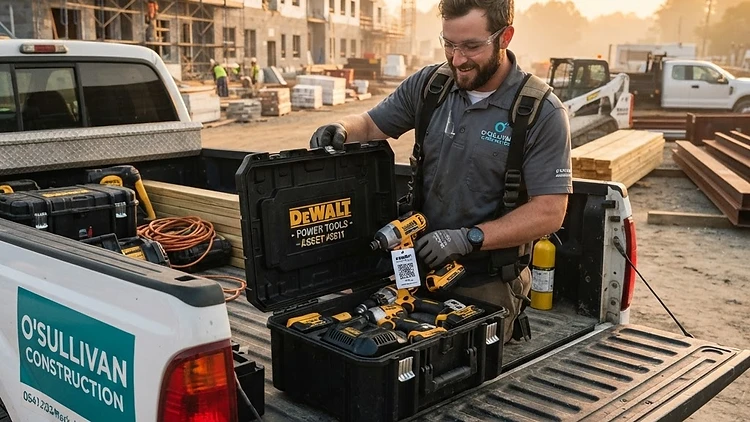
Identity only works if the physical tool and the record stay connected, and that connection is a label. A small QR code on the tool case (and on the tool itself for case-less tools) makes every interaction a scan: QR code inventory with durable labels survives grease, weather, and rough handling better than a handwritten asset tag.
Practical rules from operations that have done it:
- Label the case, and the tool if it leaves its case.
- Put the label where a camera can actually see it — flat, reachable, not on the bottom of a dusty bin.
- Include human-readable text beside the code (the tool name and an ID), so a dead phone never blocks work.
- Laminate or use weather-proof stock for anything that lives outdoors. Tools are where labels die.
An afternoon of labeling with a label printer converts the whole tool inventory from anonymous to addressable. If you are starting a labeling program from scratch, How to Create a QR Inventory System has the full rollout.
Check-out and check-in are just transfers
Once tools are labeled, movement becomes simple: a tool is always at a location, and moving it is a logged transfer. The locations are just more specific than people assume:
- The shop is a location.
- Each truck is a location.
- Each active job site is a location.
Checking a tool out to a crew member is a transfer from the shop to the truck. Taking it onto the site is a transfer from the truck to the job. Bringing it back reverses the flow. Each move is scan, scan destination, done — a few seconds at the tailgate, and the multi-location tracking record now knows exactly where the tool sits.
Notice what this design eliminates: the gray zone. A tool is never somewhere in between — it is on truck 2, or at the Maple Street site, and the transfer history shows who moved it and when. The question where is the impact driver stops being a phone call and becomes a look-up.
Count the places tools live
Transfers keep the record current; counts keep it honest. Three counting rhythms cover a tool fleet:
- Weekly tailgate counts. Each truck is a location; count it on a schedule, the same way you count a shelf. Scanning stock counts make it a five-minute job at the end of a Friday.
- Site-close counts. When a job wraps, count the site location before it disappears. This is the single highest-value count in the tool world — it is the moment that catches the tool that never got loaded, while the person who last used it is still findable.
- A shop rotation. The shop gets cycle counted monthly along with everything else.
The pattern to notice: counting works because locations are small. A truck is not a warehouse; a tailgate count is not a shutdown. Frequency becomes affordable when each count is tiny — the same argument made in How Often Should You Count Inventory?, applied to tailgates.
Attach tools to jobs, not just places
Location tells you where a tool is. Job attachment tells you what it is doing — and that is where the money is:
- Costing. Tools allocated to a job are real job costs. Even a simple per-day equipment charge gives estimates teeth: crews that see tool cost per job treat the tools differently.
- Billing. For equipment clients rent by the day, check-out and check-in dates are the invoice. The transfer log becomes the billing record, with no separate timesheet.
- Maintenance planning. A saw that has been on every job for a year is a saw with a service date coming. Usage history, not a sticky note, drives the schedule.
None of this requires a bigger system — it is the same transfer records, read a second way. Location answers where; job attachment answers who owes what.
Accountability without blame
The uncomfortable question about tool tracking is whether the crew will resent it. In practice the opposite happens, for one reason: tracking protects the honest person. When a tool is missing, the question is not which of you took it — the record says the tool went to this site on this date and was last counted there. Blame without data lands on whoever is least senior; blame with data lands on the truth, which is usually a process gap, not a theft.
Two habits keep the culture healthy:
- Never punish a variance. The moment a count finding becomes a disciplinary event, counts start agreeing with expectations instead of shelves, and the data becomes fiction.
- Make scanning easier than not scanning. If check-out takes longer than grabbing, people grab. The scan has to be the fastest path — which is exactly what a two-scan transfer is designed to be.
How CountGrid handles tool tracking
CountGrid treats tools the way this guide argues they should be treated: as per-unit assets with QR labels, living in locations (shop, trucks, job sites) and moving by logged transfer. Check-out and check-in are the same scan-based transfers as everything else, counts run against each truck and site, and a tool's full history — every move, every count, every job — is one tap away. For construction and trades teams, the construction industry page shows the whole setup end to end.
Conclusion
Tracking tools across job sites is not surveillance — it is giving every tool an address. Label the tools so records match reality, make the trucks and job sites real locations, run check-out as a two-second transfer, count the trucks weekly and the closing sites before they close, and let the history settle questions instead of arguments. Start with the ten tools that hurt most to lose: label them this week, and count the truck they ride on this Friday. The rest of the fleet will follow naturally.